Monthly Archives: February 2013

You’ve learned some coding.

Now step back.

That’s today’s lesson in class. I’ve shown animation, shape and motion tweening. I’ve shown how to use timeline code to control different movie clips. Last week I introduced code logic and variables. Today I told them to, well, basically draw.

All those bits up there are for moving things around, getting user interactivity working, but that’s no good if you can’t come up with something for it to do. For the final project, they have to come up with an interactive something. A something that uses if/else, buttons, etc. Still, before they can get to the if/else, before they can make a button do something, they have to plot out what those somethings are.

So tonight we discussed final projects. Most chose to do a flavor of the following:

  1. A match tile game
  2. A system map showing moving trains and possible collisions!
  3. A weather plotting animation – button clicks will determine how a “day” will progress
  4. A phone interface with video chat faked
  5. A she’ll game with bets and score keeping

Quite a few started worrying about the code, but seriously, that can come later. First do the fun stuff, draw out storyboards, figure out animations, deal with the coding later.

Once all the little bits that make the animation cool are ready, then settle in to the coding part. It’s like cooking, get all the necessary ingredients, mix the right bits together THEN worry about what goes in the oven and what goes in the saucepan.

Using if/else in actual code

If (winter storm warning)
{
   let students go an hour early
}

Stupid weather.  Barely 3 inches of snow, and none happened till much later!  Still, when you’re teaching at night and you see a giant blue blob of snow on the radar map, well, you cut everyone out early. Still, I battled on for over 2 hours, so they could try their hand at some simple comparisons complete with score keeping!

Check it out here

It’s fairly simple, and runs on 57 lines of code (49 if you don’t count empty lines)!  And some of those lines weren’t actually used (set-up for some extra stuff we never got to). In this, I tried to show how variables interact and change based on conditions set.  The values of money above each character’s head changes based on variables set based on which face gets clicked on.

Then the faces change based on a comparison of the money amounts.  So every time a face gets clicked, the money amounts change and are checked.  If Bob’s got more money, he gets all smug.  When Bob has less, he gets mad.

It’s all taken care of in a bitty function called checkForJerk.

function checkForJerk():void
{
if (bobsMoney > myMoney)
{
me.gotoAndStop(2);
bob.gotoAndStop(2);
}
else if (myMoney > bobsMoney)
{
me.gotoAndStop(1);
bob.gotoAndStop(3);
}
else
{
me.gotoAndStop(1);
bob.gotoAndStop(1);
}
}

I’m sure this could have been done easier with a switch/case format, but let’s get through the basics first, shall we?

Oh, and in case you didn’t notice, yes, I appropriated little troll faces for fun – no idea who made them, but if I knew, I’d give credit where it’s due.

Choose your own adventure, or if it’s sunny outside…

Go to the beach. This is how class started (more or less) last night. More or less. First, the stragglers from the class before slowly packed up their things, said bye to their friends in my class, and shambled off to wherever art/marketing/design/film students meander off to. Seriously, the concept of politeness is dead. I just talk over them and let those students who want to be distracted miss out on the opening remarks.

So the dreaded if/else statement was the topic du jour. I spent the entire evening writing on the whiteboard. No computer, no “start-up Flash and do what I say.” Well, I told them, “open up NotePad and type this in.” Some felt I meant a literal notepad and wrote only in the notebooks, even after I said, “you’re turning this in.” I have a few cellphone snapshots of people’s work, and I have to say, my eyes hurt, just a little, from fighting the urge to roll them up through all this.

So, sunshine and if/else. How else can you start explaining the concept, really? Most folks (I’m not part of “most folks” in this case) don’t think in terms of programming logic much. At least they don’t recognize it as such. I don’t usually either, but I have wondered, as I wait at a frozen bus stop in February, “if I hadn’t ducked into a Tower Records during a rainstorm in Santa Barbara back in 1994, would have ended up in Chicago in 2013?” The answer to that is probably “no.” That’s another story and I digress.

Simply put, choices we make based on variables in our lives are just like programming. Each leads to new choices and new paths to go down. Which makes <insert deity here> a snarky coder with chip stains on <his/her’s/its> D&D t-shirt. Or at best, we’re all living out the longest and oddest Choose Your Own Adventures books ever written:

If you want more coffee before your 11am meeting, turn to page 1173, if you think you can keep the yawning to a minimum, turn to page 1554.

Where was I? Oh yeah – if it’s sunny out, go to the beach, but if your boss sees you, don’t go to the beach:

var sunny:Boolean = true;
var boss:Boolean = false;
var beach:Boolean = false;

if ((sunny) && (!boss))
{
     beach = true;
}
else
{
     beach = false;
}

This took the better part of an hour to go through. I think by the end most were getting it – in the broadest terms. Next class, we’ll try and apply it to something more tangible than weather.

Little phone apps

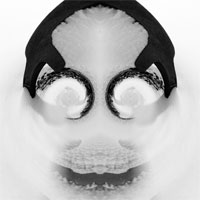
benchSkullSo I got “talked” into getting back into Instagram again… Mostly it was being shown Tiny Planets and Mirrorgram as two little supplements to play with before uploading anything to Instagram.

Both Tiny Planets and Mirrorgram are basically a couple of steps in Photoshop except all done on the phone, and with an odd little instant gratification – no sitting in a room by myself tweaking pics, I can show ‘em off to whoever’s around!

southwestWingAt any rate, I discovered that sometimes, even the simplest little tools – that most designers pro’lly scoff at – can produce some really cool effects – I’m particularly proud of the “skull,” above, that started out as quick snap of the snow covering the courtyard bench outside my building. A little twirling, and mirroring, and suddenly it was smiling right at me!

The thing about creativity…

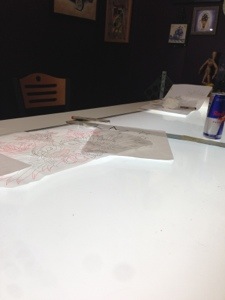
20130209-130729.jpgSo I’m sitting here at my friends tattoo parlor (well, she has a chair here), and as always I’m struck by the meticulousness of the job. Maybe I’m going to ramble on this one, so I might not post this, but I find the aspect of art on skin cool.

It reminds me of what we all do, part inspiration, part skill and training, and a whole lot of just straight up sweat and tears. I rolled into town too late for my own inking session, but I’m watching the processes of initial draft, refinements, and application in various stages right now.

Similarly my projects are part research, deconstruction, build and create. The onion’s eventual return is reminding me of all this. I haven’t even started redrawing him, I don’t know what he’s going to look like (other than oniony and red), but the first step shouldn’t be deciding the right tool, since I don’t know what that’s going to be yet.

I can find 3D sculpting tools and make a real-space onion, but how well will that import into Flash? What do I need to learn to get that to work? Is this the best way to bring the evil onion back?

Which brings me back to tattoos. It’s easy enough for me to show off a sketch and say, “I want this,” but my concepts of placement differ from the person who would be applying the actual ink. The person who knows how anatomy and art mix. Right design needs the right tools, and the right know-how. Ultimately it’s all planning and follow-through.

Which bring up the real point of this post. Here I am, and no fresh ink will be applied on me, due to damn timing.

reconstructing the onion

I’ve come to realize something about this onion. It is, as one of my more blunt students put it, “flat.” Hey, this was 12 years ago! These were simple projects in a simpler time – my god, we were still in awe over Shrek, and the incredible wooden faces the humans in that movie had. So for me to actually fake out some 3D with some simple skewing was pretty cool (for me anyway). With time and wisdom, even I wonder why I didn’t even bother with some gradients to give the illusion of depth.

Still, I was still learning to use Flash, and people were still learning to use “Google” as a verb, so it wasn’t like I had all the resources of the world at my grasp. Not yet anyway. Today, things are a little bit better. The vast resources of the web are easier to find, and most is on YouTube, narrated by 13 year olds. This coincidentally, is how I modified my Nerf Maverick, which I’m apparently no longer allowed to use in night class to shoot college students…

Where was I? Oh, the onion. I’m going to rebuild him. Ground up, which I suppose is how onions go normally. Flash apparently can rotate in 3D, but really, it’s rotating a 2D object in all it’s flattened glory in a 3D space. Apparently I’m going to have to find a new way, and that way may be Photoshop, but who knows. I’ll play with that, and maybe post an image of whatever bit of the onion I’m currently constructing.

Evil Onion ressurection… step 1 – find the offending root

Evil OnionI’ve been looking through old cds of stuff I backed up ages ago, thanks mostly to Theresa Crout’s insistence. At some point I mentioned making Flash cartoons of the most vile wicked thing that plagues me most every lunchtime – onions.

So, here are two cartoons I made somewhere way back in the foggy days of 2001: On the Road and At Home.

By the way, I have no idea why I gave him fangs. I am however still certain that onions make lousy neighbors.